

Lori Gatmaitan
Senior Consultant
Hint: it’s rarely the software that tells you. It’s everything your team has quietly built around it.
Every development shop has one. A spreadsheet that lives outside the CRM because “it’s just easier to track it there.” A shared drive folder of pledge reminders someone maintains by hand. A gift officer who is, functionally, the only person who can find a donor’s real giving history because half of it lives in her head, not in the system.
These aren’t quirks. They’re evidence. And they’re usually a better readiness signal than anything on a vendor comparison chart.
Most organizations assume the decision to replace a CRM will announce itself—a system crash, a vendor sunset notice, a contract renewal deadline that forces the question. Sometimes it does happen that way. But more often, the real signal has been building quietly for years: your team has built a shadow system of workarounds around the platform, and nobody’s stopped to add up how much of your actual fundraising infrastructure now lives outside it.
Here’s how to tell the difference between a CRM that needs a tune-up and one that’s genuinely holding your organization back, plus a resource to guide you once you’re ready to act.
~50%
of nonprofits say their donor database has helped their fundraising success
79%
now run 5+ third-party systems feeding their CRM, up from 62% just a year earlier
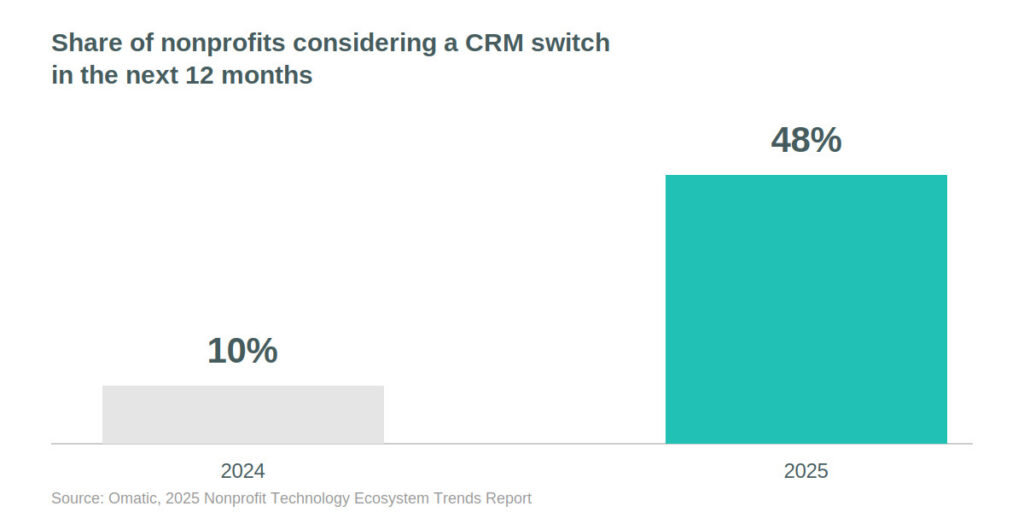
48%
are considering a CRM switch in the next 12 months—up from just 10% the year before
Sources: NTEN & Karen Graham Consulting, 2024 Donor Management Systems Use & Satisfaction Survey (via Candid) · Omatic, 2025 & 2026 Nonprofit Technology Ecosystem Trends Reports
The Workaround Test: When Your Team Works Around the CRM Instead of In It
Ask your team a simple question: what do you track outside the CRM, and why? The answers tend to come fast, and there are usually more of them than anyone expects. Moves management notes in email. Event RSVPs in a separate registration tool that never syncs back. A “real” prospect list in someone’s personal spreadsheet because the CRM’s version is six months stale.
None of that is a knock on your team—every one of those workarounds exists for a good reason in isolation, usually because someone found the fastest path to getting their job done. But add them up and they tell you something important: your system of record is no longer the record. If your most valuable relationship intelligence lives in tools your CRM can’t see, the CRM isn’t doing its job.
This is worth sitting with, because it cuts against instinct: organizations tend to stay with a familiar system even when it isn’t delivering. Familiarity, not fundraising results, is consistently the top reason nonprofits give for not switching. That’s not a reason to switch for its own sake but it’s a reason to separate “we’re used to it” from “it’s working” before you decide.
Communal Knowledge vs. Documented Process: A CRM Readiness Signal
New hires are an underrated diagnostic. Ask how long it takes a new gift officer or database admin to become genuinely productive in your system. If the honest answer involves a lot of “well, you also have to know that we do X differently” or “ask Sarah, she keeps the real process in her notebook,” that’s not a training gap—it’s a system that runs on communal knowledge instead of documented process. A CRM that’s serving your organization should make institutional knowledge portable, not dependent on the handful of people who’ve been there long enough to memorize its exceptions.
Slow Reporting Is a Data Architecture Problem, Not a Training Problem
Watch what happens the next time leadership asks for a number—total raised this quarter, retention rate by donor segment, pipeline value for major gifts. If the answer takes days instead of minutes, and involves exporting to Excel and manually reconciling two versions of the truth, that’s not a skills gap on your team. It’s a data architecture that can’t support the questions your organization needs to answer. That’s a structural issue, not a training one, and no amount of dashboard-building on top of a fragile foundation fixes it for good.
Nonprofit CRM Integrations: Why “It Won’t Talk to Our Database” Is a Red Flag
Modern advancement work depends on a constellation of tools like email marketing, event platforms, wealth screening, payment processing, AI-assisted research. A healthy CRM sits at the center of that ecosystem and keeps data flowing cleanly between systems. An aging one shows its age exactly here: integrations that used to run quietly start requiring manual exports, nightly batch jobs start throwing errors, and every new tool your team wants to adopt comes with the caveat “but it won’t talk to our CRM.” If your technology roadmap keeps getting vetoed by your database, that’s not a minor inconvenience. It’s a ceiling on what your organization can become.
The Real Question: Is Your CRM Still Built for How You Work?
None of these signals are really about software age or feature checklists. They’re about whether your CRM still reflects how your organization works or whether your organization has quietly rebuilt itself around the system’s limitations without anyone deciding that on purpose.
That distinction matters more now than it used to. The category itself is shifting—CRM vendors are building intelligence and automation directly into the platform, and the gap between a system that’s keeping pace and one that isn’t is widening faster than it used to. Standing still isn’t neutral anymore. A CRM that was merely adequate three years ago may be actively limiting what’s possible today.
What CRM Readiness Actually Looks Like for Nonprofits
You don’t need a crisis to justify evaluating a new system. You need evidence—and the workarounds, the onboarding friction, the reporting lag, and the integration ceiling are all evidence, sitting in plain sight, that most organizations have simply learned to live with.
The organizations that make this transition well aren’t the ones with the oldest CRM or the longest list of complaints. They’re the ones willing to ask honestly: is our system helping us grow relationships, or are we spending our energy managing around it? If the honest answer is the second one, you’re not early to this conversation. You’re right on time and, per the numbers above, in good company.
That’s the position Ann & Robert H. Lurie Children’s Hospital of Chicago was in when they partnered with Benefactor Group in 2024—a nationally recognized pediatric care system that needed a CRM capable of supporting real cross-departmental growth, not just storing donor records. You can read how that selection process unfolded in Finding a Systems Solution for Lurie Children’s Hospital.
Ready for a New CRM? Here’s How to Start the Selection Process
Recognizing the signs is the first step. Acting on them well is the harder part—assembling the right internal team, defining what you need versus what a vendor demo makes you want, building an RFP that surfaces real differences between platforms, and creating a rubric that keeps the decision honest instead of political.
That’s exactly what our guide, 13 Steps to Find New Fundraising CRM Software, walks you through—a practical, step-by-step path from “our system isn’t working” to “we chose the right one, with confidence.”
Want the fuller picture? 10 Signs Your Nonprofit Needs a New CRM and How Can You Make the Case for a New Nonprofit CRM? go deeper on the diagnostic checklist and the internal business case, respectively.
Benefactor Group helps mission-driven organizations evaluate, select, and implement the CRM systems that fit how they work—not just how a vendor demo makes it look. Download the full guide, or let’s talk if you’re ready to start the conversation.